
Intermountain Health
Intermountain HealthcareMedical
4.3813.00 Reviews
- Version
- 11.7.2
- Installs
- 100.00K
- Age Rating
- Everyone
Screenshots

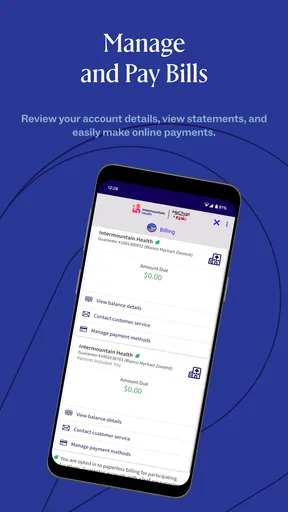
Our Review of Intermountain Health
 Analysis by Appyee
I approached Intermountain Health as a practical medical companion rather than as a replacement for a clinic, a pharmacist, or urgent care. Its purpose is straightforward: put parts of the Intermountain Healthcare relationship into a mobile app so everyday health tasks are easier to manage. That makes it most useful for people who already receive care through Intermountain and want a more convenient way to stay connected with their health information.
The app is free, available for Everyone, and sits in the Medical category. It comes from Intermountain Healthcare, has passed the 100K+ install mark, and holds a 4.1 average from around 1.3K ratings. Those figures suggest a useful but not universally frictionless experience. In my view, the important question is not whether every patient needs it, but whether your doctors and care services are part of the Intermountain system.
How Intermountain Health feels in everyday use
The strongest part of the experience is the idea of having a single starting point for routine care. Instead of moving between a browser, phone calls, paper instructions, and separate reminders, I can see why a patient would prefer opening one healthcare app first. That is especially helpful when I am trying to remember where to look for a previous conversation, prepare for an appointment, or deal with a task that is easy to postpone when it requires calling during office hours.
A realistic example is a week in which I need to prepare for an upcoming visit, check something related to my care, and follow up after speaking with a provider. The value is not dramatic or flashy. It comes from reducing small bits of friction. A medical app earns its place on my phone when it helps me complete those ordinary jobs without making me search through old messages or guess which department to contact.
That convenience also depends heavily on the health system behind it. If I regularly use Intermountain Healthcare, the app has a clear reason to be installed. If my doctors, prescriptions, and appointments are spread across unrelated providers, its usefulness becomes narrower. In that situation, a general health-record tool or the individual portals used by my providers may be more practical than adding another app.
A focused tool rather than a general wellness tracker
One thing I would keep clear is the app’s role. This is not the kind of product I would choose for exercise tracking, calorie logging, meditation, or broad lifestyle coaching. Its identity is tied to care management and communication around Intermountain services. That focus is a strength because it avoids pretending to be an all-purpose health dashboard, but it also means it will not replace a fitness app or a device companion.
I also would not treat it as an emergency channel. A mobile patient app can be convenient for normal care administration, yet urgent symptoms need the appropriate emergency service or immediate professional attention. The app makes more sense for planned, documented, and follow-up-related needs than for situations where waiting for a digital response would be unsafe.
The practical benefit of one familiar entry point
For an existing patient, familiarity matters more than a long feature list. Medical information is often stressful to manage, and a consistent place to begin can make a difference when I am tired, worried, or trying to help a family member. The best workflow is to open the app before making a phone call, see whether the issue can be handled digitally, and only then move to a call if the matter is more complicated.
That approach can save time, but it also prevents a common mistake: assuming every healthcare question belongs in a message. Administrative requests may fit a digital workflow, while symptoms, medication reactions, and rapidly changing conditions may require direct clinical attention. The app is most effective when I use it as an organized doorway into care, not as a substitute for judgment.
What the current version tells me about its evolution
The current release is version 11.7.2, and the app was released on January 17, 2019. That combination gives the product some history: it is not a brand-new experiment, but an established service that has had time to move through multiple revisions. I see that as encouraging for continuity, especially in healthcare, where people want a familiar tool rather than a completely redesigned experience every few months.
At the same time, a version number by itself does not prove that every part of the experience has improved equally. A mature patient app can still have awkward navigation, uneven department workflows, or screens that feel designed around an institution’s processes instead of a patient’s immediate question. I would judge the update history by whether common tasks feel clearer and more dependable, not simply by the fact that the number has advanced.
The current Android requirement is 11. That is worth checking before installation, particularly if I am using an older phone that still works well for other apps. Requiring a newer operating system can help an app rely on modern security and system behavior, but it also leaves some older devices out. For a medical app, I would rather use a supported device than force an outdated phone into a sensitive workflow, yet the compatibility requirement is still a practical consideration.
Why version changes matter more here than visual polish
With a medical app, I care less about decorative redesigns and more about predictable behavior. A meaningful improvement would be a clearer route to the right department, fewer confusing transitions, better handling of interrupted sessions, or more understandable status information after I submit something. Those details affect whether I trust the app when I need it.
There is also a difference between an app being technically current and an app being personally useful. Intermountain Health can be well maintained and still feel limited if my particular clinic does not use every available digital workflow. The experience may vary according to the kind of care I receive, the department involved, and whether the task is handled centrally or locally. That is not necessarily a flaw in the phone interface, but it is an important part of evaluating it honestly.
What existing users may notice after updating
Someone who has used the app for years may not see a single change that transforms the entire experience. More often, evolution in a healthcare app appears as small adjustments: a familiar action moves, a page loads differently, or an account step becomes more visible. My advice is to avoid updating immediately before an important appointment if I depend on a known workflow and have no time to relearn it.
After an update, I would open the app calmly and check the routes I use most. I would confirm that I can still reach my care information, identify where communication tools now live, and make sure I understand any new prompts. This is a simple habit, but it matters more here than in a casual entertainment app because confusion at the wrong moment can lead to missed preparation or unnecessary calls.
Where the app fits better than the usual alternatives
The usual alternative is a web patient portal opened in a browser. A browser can be perfectly adequate, especially when I use a shared computer, need a larger screen, or prefer not to keep another app installed. The dedicated app becomes more attractive when I want a quick mobile entry point and expect to check care-related information while away from home.
Phone calls remain the better option for nuanced problems. A call lets me explain context, ask follow-up questions immediately, and clarify an issue that does not fit neatly into a form or message. The trade-off is the time spent waiting, navigating menus, or calling during limited hours. I see Intermountain Health as a way to handle the straightforward portion of that work, not as a reason to abandon direct contact when the situation needs conversation.
Another alternative is using several separate apps from different providers. That arrangement may be unavoidable for people who receive care in multiple systems. Intermountain Health has the advantage of being specific to Intermountain Healthcare, but that same specificity limits its usefulness outside that network. A broader health-record organizer may offer a wider view, while this app may provide a more direct connection to the system that operates it.
Who is likely to get the most from it
I would recommend it first to an Intermountain patient who handles recurring appointments, follow-up tasks, or routine communication from a phone. It can also suit someone helping a parent or another family member stay organized, provided the account and access arrangements are handled correctly. The benefit is greatest when the app becomes part of a regular workflow rather than something installed only once and forgotten.
It is less compelling for someone whose healthcare is entirely outside Intermountain, someone who dislikes managing accounts on a phone, or someone seeking a general-purpose wellness application. I would also be cautious about relying on it as the only way to reach care. Keeping the relevant clinic phone number available is sensible, particularly when an issue is urgent, sensitive, or too complicated for a digital exchange.
Three habits that make the app more useful
Use it as the first check, not the final authority. Before calling about a routine matter, I would look in the app for the appropriate pathway. If the issue involves symptoms, a medication concern, or a rapidly changing condition, I would move directly to professional help instead of waiting for an in-app response.
Review important information before the appointment day. Opening the app a few days ahead gives me time to identify missing details, understand what I need to prepare, and contact the clinic if something is unclear. Doing this in the parking lot or minutes before a visit defeats much of the convenience.
Keep a backup route for time-sensitive care. A phone battery, connection problem, sign-in issue, or unfamiliar update can interrupt any mobile workflow. I would save the clinic’s normal contact route separately and avoid treating the app as the sole channel for something that cannot wait.
These habits reveal an important trade-off. The app can reduce administrative effort, but it also encourages me to take responsibility for checking status, choosing the right channel, and noticing when digital communication is not enough. That is useful when I am organized, but it may feel like extra work for someone who wants a person to guide every step.
Remaining gaps and points of friction
The biggest limitation is the boundary between the app and the healthcare organization. A polished interface cannot make every department equally responsive or every care process equally simple. If one task is available digitally but another still requires a call, I may experience the system as inconsistent even when the app itself is functioning normally.
There is also the general burden of medical account security. That protection is necessary, but sign-in steps and session interruptions can feel inconvenient when I am trying to complete a quick task. I consider that a reasonable trade-off for sensitive information, although the app is easier to live with when I use a secure device and keep my account details accessible through a safe method.
People managing several family members may find that organization becomes more complicated than the basic patient workflow. Switching between identities, remembering which information belongs to whom, and avoiding accidental confusion requires attention. I would not assume that a family-caregiving situation will feel as simple as managing my own care, even if the app supports the relevant account arrangements.
Another gap is expectation management. The store summary, “Care Simplified by MyChart,” communicates the general direction, but a short summary cannot explain which parts of care will feel simple for a particular patient. Before depending on the app, I would test it with a low-pressure task. That gives me a realistic sense of how well it fits my clinic and avoids discovering limitations during an important appointment.
Privacy and device choices deserve attention
Because this is a medical app, I would install it only on a device protected by a screen lock and kept reasonably current. I would also think carefully before using it on a shared phone. Convenience is valuable, but health information should not be exposed simply because another person can open the device.
I would be equally careful with notifications. A notification that reveals too much on a locked screen can create an unnecessary privacy problem. Adjusting the phone’s notification display is a small but worthwhile step, especially if the device is often visible to family, coworkers, or other people in public.
These are not reasons to avoid Intermountain Health. They are part of using any patient-facing medical service responsibly. The app can simplify access, but the user still controls the device, the account, and the environment in which sensitive information appears.
What I would watch as the app continues to develop
For future updates, I would watch whether the experience becomes more consistent across different care situations. The most valuable progress would be clearer task ownership, better explanations when something cannot be completed digitally, and smoother movement from an app-based request to the right human contact. Those improvements would matter more to me than a cosmetic refresh.
I would also look for signs that the app remains comfortable for both frequent and occasional users. Regular patients benefit from speed, while occasional users need obvious labels and guidance because they may open the app only when an appointment or follow-up requires it. A good medical app has to serve both groups without burying important actions under a complicated menu.
Compatibility should remain on my checklist as well. The current minimum of Android 11 is manageable for many users, but anyone with an older phone needs to verify support before making the app part of a care routine. If a device is no longer supported, the browser or a direct call may be the more dependable fallback.
Finally, I would watch how well the product keeps its promise of simplifying care without oversimplifying it. Healthcare contains exceptions, personal context, and urgent situations that cannot be reduced to a button. The best evolution would preserve convenient self-service while making the handoff to a professional obvious whenever the app reaches its limits.
My recommendation
After looking at its role, maturity, and practical trade-offs, I see Intermountain Health as a sensible free companion for people already connected to Intermountain Healthcare. Its value comes from convenience, continuity, and having a mobile place to begin routine care tasks. The 4.1 average indicates a generally positive reception, while the experience will still depend on the user’s clinic, care needs, device, and comfort with digital healthcare.
I would install it if Intermountain is my main healthcare system and I regularly manage appointments or follow-up through my phone. I would not install it expecting a universal health dashboard, emergency support, or a replacement for meaningful conversations with clinicians. For those needs, a direct call, a browser-based portal, or another specialized tool may be better.
My final view is cautiously positive: Intermountain Health is most useful when treated as a reliable front door to routine care, not as the whole healthcare experience. If that matches how I receive care, the app can remove enough small obstacles to justify keeping it available. If my providers are outside the Intermountain network or my needs are mainly wellness-related, its focused design may not offer enough to make it worthwhile.
Privacy and Permissions
See what permissions an app requests and how it handles your data.
- Location
- approximate location (network-based), precise location (GPS and network-based)
- Phone
- directly call phone numbers
- Photos/Media/Files
- read the contents of your USB storage, modify or delete the contents of your USB storage
- Storage
- read the contents of your USB storage, modify or delete the contents of your USB storage
- Camera
- take pictures and videos
- Microphone
- record audio
- Other
- view network connections, pair with Bluetooth devices, access Bluetooth settings, full network access, change your audio settings, run at startup, control vibration, prevent device from sleeping
Verdict
Strengths of Intermountain Health
- Easy access to appointments, test results, and medical records in one place.
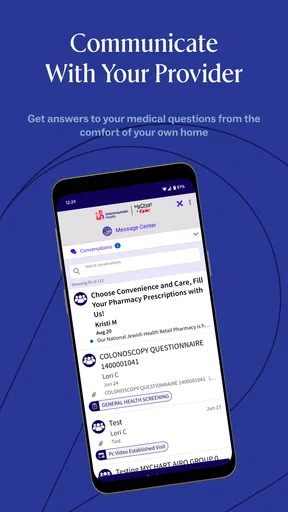
- Secure messaging makes it convenient to contact care teams remotely.
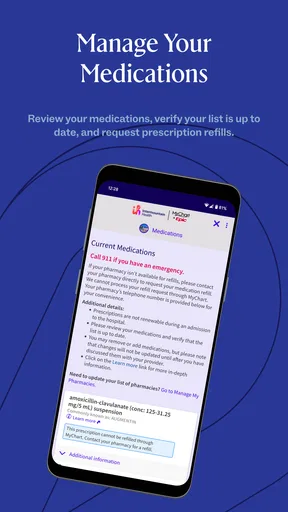
- Prescription refill requests can save time and reduce phone calls.
- Health information is organized clearly for quick reference.
- Useful location tools help users find nearby Intermountain facilities.
Limitations of Intermountain Health
- Some features may require an Intermountain Health patient account.
- Availability of digital services can vary by clinic or care provider.
- Appointment options may be limited during busy periods.
- The app may feel less useful for patients outside the Intermountain network.
- Certain actions may redirect users to external services or web pages.
Similar Picks in This Category
View All
WebMD: Symptom Checker
WebMD, LLC4.1

Microphone Amplifier
DOSA Apps4.2

Anatomy Learning - 3D Anatomy
3D Medical OU4.5

Period Tracker and Calendar
SimpleInnovation4.9

GoodRx: Prescription Coupons
GoodRx4.8

CVS Health
CVS Pharmacy4.5
Frequently Asked Questions
What is the Intermountain Health app used for?
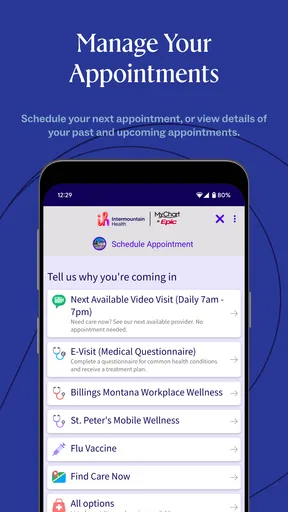
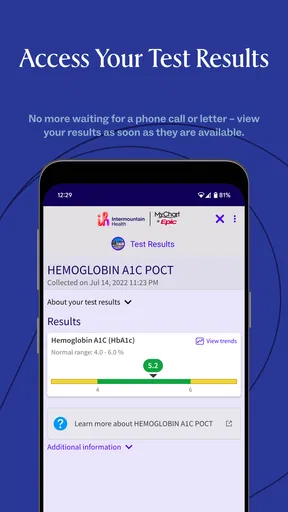
The Intermountain Health app is designed to help patients manage many everyday healthcare needs from a mobile device. After signing in, you can typically view parts of your medical record, review test results, manage appointments, communicate with care teams, request prescription refills, check bills, and access health information. Available features may vary depending on your location, provider, and Intermountain services.
Do I need to be an Intermountain Health patient to use the app?
Many of the app’s most useful tools require an active Intermountain Health patient account and access to the organization’s online patient portal. Some general information or public health resources may be available without signing in, but appointment management, messages, records, and billing usually require verification. If you are unsure, check whether your clinic participates before downloading.
How do I sign in or create an Intermountain Health account?
You generally sign in using the username and password connected to your Intermountain Health patient portal account. New users may be able to register through the app or the official website using personal information and an activation code supplied by a clinic. For security, account recovery may require identity verification. Contact Intermountain support or your provider if registration fails.
Can I schedule appointments and communicate with my doctor through the app?
For participating Intermountain Health clinics, the app can make routine care coordination more convenient. Depending on your provider and appointment type, you may be able to request or schedule visits, view upcoming appointments, receive reminders, and send secure messages to members of your care team. Online scheduling is not available for every specialty, condition, or urgent medical situation.
Is the Intermountain Health app suitable for emergencies or urgent symptoms?
No. The app should not be used as a replacement for emergency services, immediate medical evaluation, or professional advice. If you have life-threatening symptoms, call your local emergency number immediately. For non-life-threatening but urgent concerns, use Intermountain’s approved urgent-care or nurse-advice options, when available, and follow the medical guidance provided by qualified professionals.
